
Everyday AI data handling
Review screen captures before AI use
Treat a screenshot as a disclosure of everything visible in its pixels, including small text, URLs, identifiers and console details. Prepare the minimum image needed for the question, remove unnecessary sensitive content using an approved workflow, then reopen the actual exported file. A picture format does not make readable company information harmless to share.
For IT security and customer-facing teams
Check the URL, side panels and small text as well as the main message.
Code-native fictional interface. All identifiers and token-like strings are fake; no OCR or endpoint-enforcement result is asserted.01
Define what the assistant needs to see
Start with the question the image should answer. If the task concerns an error message, the entire desktop or customer record may be unnecessary. Choose a view that preserves the useful error and surrounding context without unrelated information.
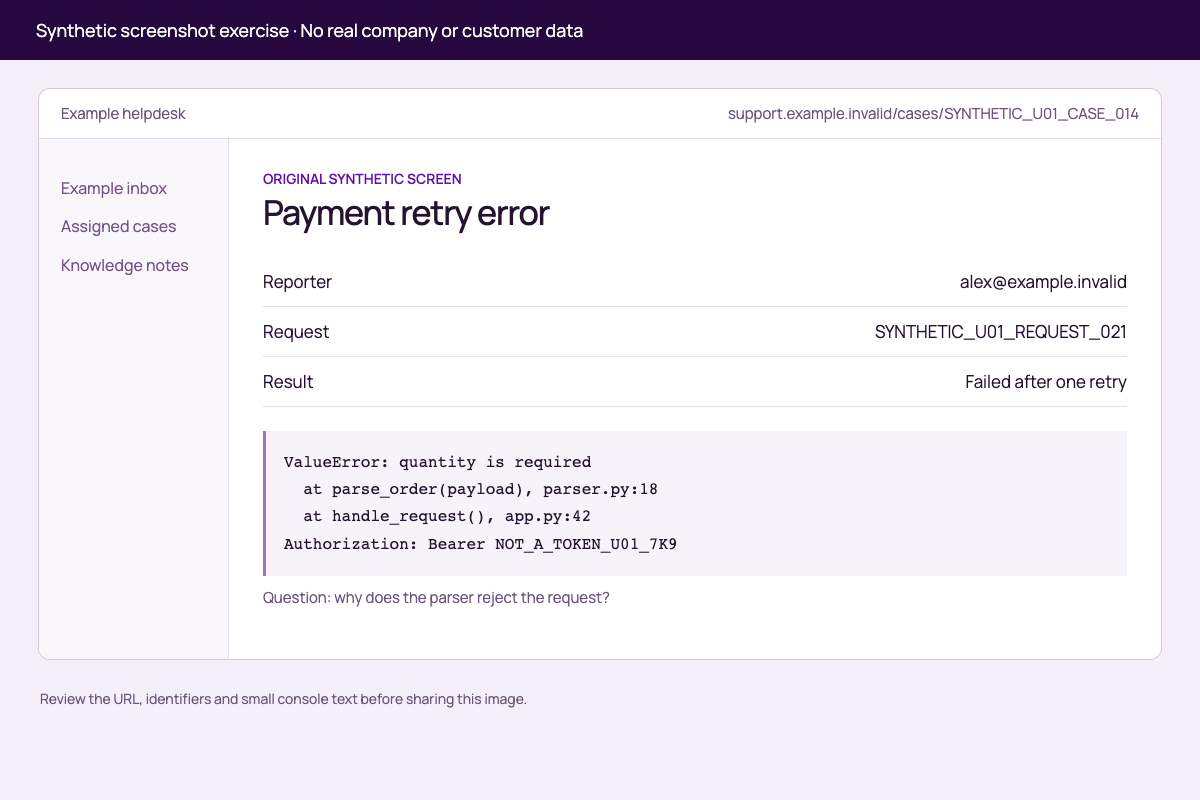
The download uses a fictional helpdesk screen. Its reporter address, request identifier and bearer-style marker are all synthetic. The example shows why a useful troubleshooting screenshot can contain several different disclosure decisions even when the main error text seems innocuous.
02
Inspect the whole image at useful resolution
Review browser or application chrome, address bars, account labels, tabs, side panels, tooltips and console output. Small text may be readable to people or image-capable tools. Do not rely on a reduced thumbnail to decide that a value cannot be recovered from the full image.
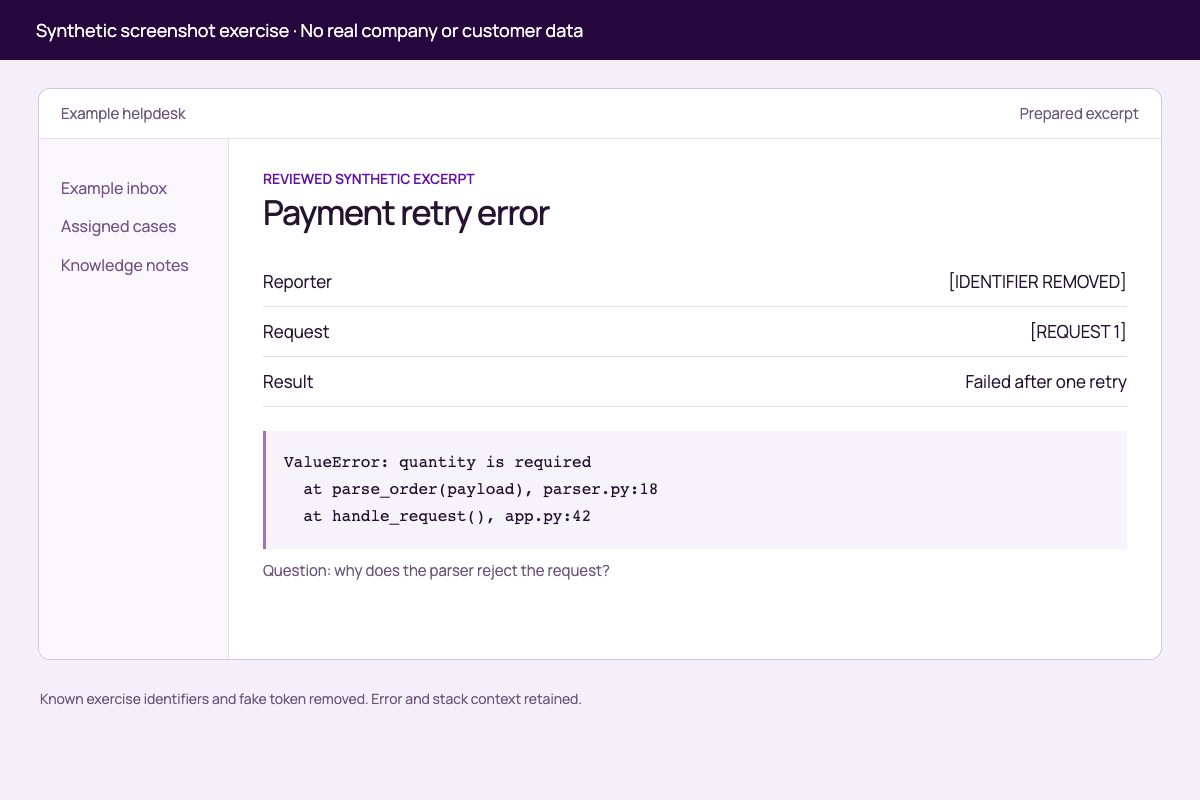
In the source example, the top URL contains a case marker, the main panel includes a reporter and request marker, and the console includes a fake token. The prepared version removes those known values while retaining the error, stack frames and a consistent request placeholder.
| Image area | Synthetic source detail | Prepared example |
|---|---|---|
| Top toolbar | Case marker in the URL | Generic prepared-excerpt label |
| Main record | Example email and request identifier | Neutral placeholders |
| Console | Fake bearer-style token | Unnecessary line removed |
| Error and stack | Missing quantity and two frames | Retained for the question |
03
Prepare and inspect the exported copy
Use the organisation’s approved image-handling method to remove unnecessary pixels or capture a narrower clean view. Keep enough context for the task to remain understandable. A decorative overlay or light blur should not be treated as a guarantee that text is no longer readable.
Reopen the exact raster file you plan to attach and inspect it at full resolution. Check that you have selected the prepared copy rather than the original. If you keep an editable source document or presentation, review that file separately because its underlying layers and embedded material are a different task.
04
Resolve the remaining disclosure decision
A clean-looking image may still reveal customer circumstances, internal routes or business information that the task does not require. Record who permits the remaining material to be sent to the selected service and account. Removing an identifier is not the same as obtaining permission for the content.
OAIC guidance recommends reviewing privacy risks and suitability before entering personal information into AI products. Apply the organisation’s own obligations to the actual data and service. The synthetic example illustrates preparation and review; it does not certify an arbitrary screenshot as anonymous or legally shareable.
Source context: OAIC: Use of commercially available AI products
05
Keep image preparation separate from control coverage
Confirm the exact upload or paste path if an endpoint policy is part of the workflow. A text-prompt test does not establish image analysis or OCR coverage, and a supported document format does not establish screenshot-redaction support.
Use the downloadable image pair and review key for training with fake content only. The images were created from a synthetic interface and visually checked; no AI service or Aona protection test is claimed. Live screen sharing introduces changing content and session controls, which belong in the separate guide.
Put it into practice
Synthetic screenshot review pair
Compare the original pixels with a prepared copy and identify what was removed or retained.
Code-native fictional interface. All identifiers and token-like strings are fake; no OCR or endpoint-enforcement result is asserted.
Removed
Case URL marker, reporter address and fake token
See the review key
Preserved
Error, two stack frames and request relationship
Enough context for the question
Still to decide
Permission and supported upload path
No real-service test performed
| Check | Look for | Decision |
|---|---|---|
| Peripheral content | URLs, account labels and side panels | Needed for the question? |
| Small text | Console values and identifiers | Remove unnecessary disclosure |
| Prepared copy | The exact exported image | Inspect again at full resolution |
Work through your review
Use the checks to organise the evidence you need. Save your selections in Word, then add your notes and evidence. Your selections stay in this tab until you download them.
0 of 3 reviewed
Examples and review material
Read the detail here, or keep the PDF, editable Word document and spreadsheets together.
Static screenshot exerciseRead
Both images show a fictional interface and contain no real company data. The raw image includes deliberate fake identifiers and a non-working token-like marker. No live screen, account or AI service was accessed.
Compare screenshot-before.png with screenshot-reviewed.png at full resolution. Use review-key.csv to find the known changes, then complete the “Image disclosure review” section. The prepared image was rendered from the intended clean content, not produced by a general redaction engine. Do not treat this pair as proof that arbitrary blurring or an endpoint product removes image data.
Guide and sources
Canonical guide: https://aona.ai/resources/guides/company-screenshots-ai-data-leaks/ Source review: 2026-09-21
- OAIC: Use of commercially available AI products: https://www.oaic.gov.au/privacy/privacy-guidance-for-organisations-and-government-agencies/guidance-on-privacy-and-the-use-of-commercially-available-ai-products
Review keyRead
| Area | Source example | Prepared example | Purpose |
|---|---|---|---|
| Toolbar | SYNTHETIC_U01_CASE_014 | Prepared excerpt | Remove case-specific URL |
| Reporter | alex@example.invalid | [IDENTIFIER REMOVED] | Remove unnecessary identifier |
| Request | SYNTHETIC_U01_REQUEST_021 | [REQUEST 1] | Preserve correlation without original marker |
| Console | NOT_A_TOKEN_U01_7K9 | Line removed | Remove fake credential-like detail |
| Error | ValueError and two stack frames | Retained | Preserve debugging context |
Image disclosure reviewRead
Question the image must answer: ____________________ Minimum useful view: ____________________ Peripheral and small-text findings: ____________________ Pixels removed or clean view recaptured: ____________________ Exact exported filename reopened: ____________________ Remaining content owner/account approval: ____________________ Intended input-path coverage: UNVERIFIED Decision: NOT YET REVIEWED
Original practice files
Keep these examples in their original format to inspect the details described in the guide.
Screenshot beforePNG
Screenshot reviewedPNG
Before you proceed
Keep these distinctions clear
- Reviewing only a thumbnail
- The original image can retain readable detail that is invisible at a reduced preview size.
- Attaching the original by mistake
- Reopen and identify the actual prepared file before sharing it.
Apply it to employee AI use
Bring your actual data path.
Aona secures employees’ AI use on supported, installed endpoint paths.
This topic does not establish automatic screenshot OCR, image redaction or coverage of every image input. Confirm the exact supported route.
Use the synthetic image pair to discuss the required control and whether the selected endpoint path can meet it.
Review your use caseFAQ
Questions for this decision
Is a screenshot safer simply because the information is not plain text?
Does the prepared example prove blur is safe?
Can Aona redact every screenshot sent to AI?
Does this checklist cover continuous screen sharing?
Evidence behind the guide
Sources and scope
Prepared by Aona. Sources checked 2026-09-21. The cited material supports the specific points below; it does not certify a product or your use case.
- OAIC: Use of commercially available AI products
Explains suitability and privacy review for personal information supplied to AI.
regulator · checked 2026-09-21